A learning app for your language school: what it costs and when it pays off
Whether students stay on is decided between two lessons. What a learning app under your school's name does, what it costs, and who it does not pay off for.

Mikail Kuchmetzki
Learning platforms 4 min read

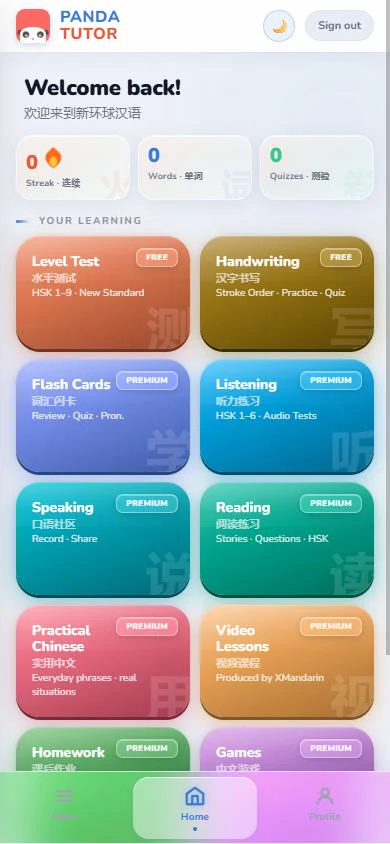
Photo: Vitaly Gariev / Unsplash, edited
Every language school knows the pattern. The lesson goes well, the group is motivated, the teacher hands out homework. Then come six days without class, and the next lesson starts with revision again. Students who do nothing in those days fall behind, and students who fall behind do not book the next course.
This article explains what a learning app of your own does for exactly those weeks, what it costs, and when I would advise you against one.
The real problem is between the lessons
The lesson itself is rarely the problem. The days in between are. Students practise alone, with worksheets, a textbook or an app that has nothing to do with your course. The teacher sees none of it and only finds out in class who has not practised.
A learning app of your own works right there. It holds the material the course is currently covering and shows the teacher who is practising and where students get stuck. The next lesson can then start where the group actually is.
Without an app
Mon
Tue
Wed
Thu
Fri
Sat
Sun
With your own app
Mon
Tue
Wed
Thu
Fri
Sat
Sun

Three options, and how they differ
If you want to give students something for home, there are essentially three ways:
- Recommend an existing language app. Costs the school nothing, but has nothing to do with your course. Students practise someone else's vocabulary in someone else's order, and your school does not appear anywhere.
- Use a general learning management system (LMS). It lets you share files and assignments. But an LMS is built for administration, not for daily practice on a phone, and it looks like every other LMS.
- Your own learning app under your name. Your logo, your colours, your material, built for short practice sessions on the phone. Plus a teacher view that shows who is practising.
For a long time the third option was only for schools with their own development budget. That has changed because the technical foundation can be reused: what gets built new is mostly what makes your school yours.
What goes into a learning app of your own
One example from practice is the app I built for the language school XMandarin, which is in daily use there. It has ten modules, more than 11,000 vocabulary items across seven levels, and a teacher view. More than 250 students are registered.
Typical building blocks are:
- flashcards with spaced repetition
- listening and reading exercises for the current course material
- homework that the teacher assigns and reviews
- a placement test for new students
- progress per student and per group
Which modules you need depends on how you teach. A school focused on exam preparation needs different priorities from a school running children's courses. In the interactive demo you can click through the modules with your own school's name.
What it costs
At Mikavo, setting up your own learning platform costs from €1,900 once, and running it from €79 a month. That includes hosting, maintenance and updates. The exact price depends on three things:
- how many students will use the app,
- how much material should be ready at launch,
- which modules you need.
After the first call you get a fixed price, before anything is built.
A worked example
The numbers here are assumptions, so put in your own. Say a course at your school costs €300 per term of six months. Running the app costs about €474 per term (six months at €79). If the app keeps two more students until the next course, the running costs are covered. Every additional student who stays is profit.
Running the app, one term
€474
Two students who stay
€600
Two students who stay pay for running it.
So the real question is not whether the app costs money, but whether it keeps two or more students per term at your school.
When an app of your own does not pay off
Honestly, not for every school. I would advise against it if
- you teach alone and have only a handful of students. The benefit grows with the number of students, the cost barely does.
- your students already practise regularly and happily with an existing system. Switching would be effort without gain.
- you have no material of your own and do not want to license any. The app is only as good as what is in it.
What to clarify beforehand
Three questions that belong on the table early in every project:
- Rights to the material. Texts, exercises and audio must be yours or licensed. Audio carries two rights: one for the text and one for the recording.
- Data protection. Which student data is stored, where it is held and who can see it. This belongs in your privacy policy.
- Upkeep. Who adds new content when a new course starts. Your team can do it, or I can.
How it works
After a free call you send me your material, I set up the platform in your colours and under your name, and after two to four weeks it is live. You can find the full process on the page How it works.
The best question to start with is a simple one: what do your students do between two lessons today? If the answer is "not much", a conversation is worth it.